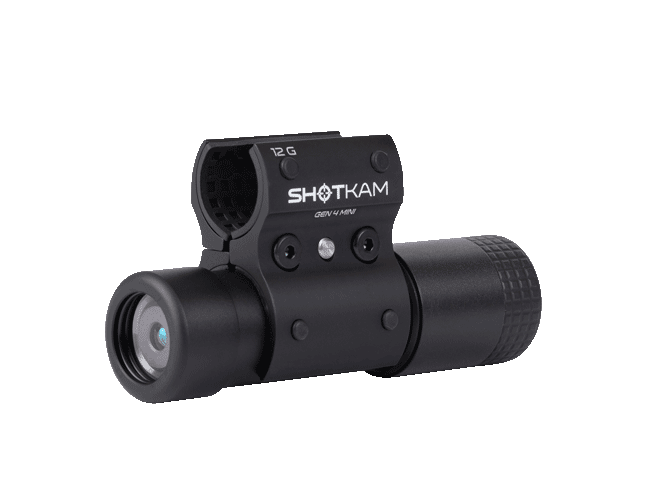

ShotKam Guide for Clay Shooting
Whether you're shooting sporting clays, skeet, or trap, ShotKam is a great training tool to help improve your shooting. Reviewing your footage in slow motion, at home or at the range, lets you analyze your hold point, break point, gun movement, and follow-through, helping you identify areas for improvement.
In this guide, we'll walk through the recommended ShotKam settings and a few tips to help you get the most from every round.
Watch clay shooting highlights filmed with the ShotKam Gen 4 below:
Pre-Round Prep
Most of your ShotKam setup can be completed before arriving at the range. Taking a few minutes to prepare beforehand means less time adjusting settings and more time focusing on your shooting.

Once your preferred settings are saved, all you'll need to do on the day is mount your ShotKam, turn it on, and enjoy your round.
Charging and Mounting
Before heading to the range, fully charge your ShotKam using the supplied USB cable and wall adapter. While charging, a flashing red LED indicates the battery is charging. After approximately three hours, the LED will turn solid, indicating the battery is fully charged.
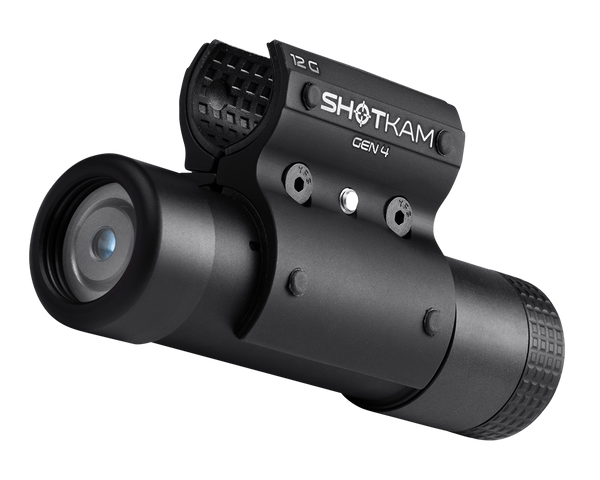
Mount the ShotKam 3 to 7 inches from the muzzle of your shotgun. As mentioned in our "Top Tip" blog, the supplied Allen driver provides a quick way to achieve consistent positioning, with the length from the handle to the tip measuring approximately 5 inches.

Consistent mounting helps ensure your reticle calibration remains accurate every time you shoot.
Connect to the ShotKam App
With your ShotKam mounted, hold the power button for three seconds until two LEDs appear to activate WiFi. Connect your smartphone or tablet to the ShotKam network, then open the ShotKam app.
The following settings can all be configured before your round begins.
Configure Settings in the ShotKam App

Target Type
Under Target Type, select Clays.
This mode is specifically designed for clay target sports, including sporting clays, skeet, trap, and FITASC. It records approximately two seconds before the shot and one second afterward, producing a 9 to 15-second playback clip that clearly captures target acquisition, the shot, and your follow-through.
Gun Type
Selecting the correct shotgun type is essential for reliable recording.
Choose the firearm that matches your setup, whether you're shooting a break-action, semi-automatic, or pump-action shotgun. The ShotKam uses different recoil profiles for each firearm type to ensure every shot is recorded consistently.
Wake-Up Sensitivity
For most clay shooters, the default Normal wake-up sensitivity works well.
The ShotKam automatically enters sleep mode between shooting stands to preserve battery life. Simply mount your shotgun as you prepare to call for the target, and the movement will wake the camera, ready to record your shot.
If you find the camera is waking too easily while carrying your gun, you can reduce the sensitivity. Likewise, if you prefer it to wake with very little movement, the sensitivity can be increased.

Reticle Selection
The reticle is a valuable training aid, allowing you to review exactly where the muzzle was relative to the target.
Many shooters prefer the standard red dot because it provides a clear aiming reference without distracting from the footage. Others may choose one of the crosshair options or disable the reticle entirely for cleaner videos.
Choose whichever option best suits how you like to review your shooting.

Video Quality
The default 2.7K at 120 fps setting is recommended for most clay shooters.
The higher frame rate provides smoother slow-motion playback, making it easier to analyze lead, timing, and follow-through. Although 4K offers greater resolution, it records at 60 fps, so for most coaching and training purposes, 2.7K delivers the better overall experience.
Playback Speed
Playback speed plays an important role when reviewing your footage.
The recommended Normal playback setting records footage at one-third speed, closely matching how the human eye naturally tracks a moving clay target. This makes it much easier to evaluate your gun movement and timing after each shot.
Crosshair Calibration
Before shooting, make sure your ShotKam is properly calibrated.
Calibration aligns the on-screen reticle with your shotgun's point of aim, ensuring the footage accurately represents where your barrel was pointing.
If you change shotguns, remember to check the calibration and recalibrate if required before your next round.
For different calibration methods, check out our "Bench," "Buddy System," and "Lone Wolf" guides in our Tips and Tricks blog.

Reviewing Your Shots
One of ShotKam's biggest advantages is the ability to review every shot immediately after your round via the free ShotKam App.
Watching your footage in slow motion allows you to identify common shooting mistakes such as:
- Stopping the gun.
- Looking at the bead instead of the target.
- Shooting over or under the target.
- Incorrect lead.
- Poor follow-through.
Even experienced shooters can benefit from seeing exactly what happened rather than relying on memory.
Over time, reviewing your videos can help build consistency and confidence across all clay disciplines.

Pro Tips
Keep your battery topped up – Fully charge your ShotKam before every visit to the range.
Check your calibration – If you remove or remount your ShotKam, it's worth confirming the reticle is still properly aligned.
Review between stations – If you're practicing rather than competing, reviewing the occasional miss can help identify mistakes before they become habits.
Clean the lens – Powder residue, dust, and fingerprints can affect video quality. A quick wipe with a microfiber cloth keeps your footage sharp.
Use the right playback speed – Reviewing footage at the recommended playback speed makes it much easier to analyze your technique.

Ready for Your Next Round
With your ShotKam fully charged, mounted correctly, and configured for clay shooting, you're ready to step onto the range.
Whether you're breaking your first target or fine-tuning your performance for competition, reviewing your shots with ShotKam provides valuable feedback that can help improve consistency, confidence, and scores every time you shoot.
You are reading:
ShotKam Guide for Clay Shooting
More Articles You Might Like

Dove Hunting Q&A with David Stewart, ShotKam Founder
We sat down with David Stewart, founder of ShotKam and an experienced wingshooter of more than 40 years, to ask him for his best dove hun...

Get Ready for Hunting Season
With hunting season just around the corner, now is the perfect time to pull your gear out of storage and make sure everything is ready be...